0815 DE
In stock
Item EUR 106,85 · Shipping free · No mandatory fees · VAT included · New
Delivered total
EUR106,8530-day low (item price): EUR 103,82, 12 Oct
Awin · 2026-10-29 20:18 (Europe/Berlin)
destination context: Germany · EUR
Contour Design
2 live offers
Ordered by delivered total, lowest first. Offers whose total is not stated follow; that placement says nothing about their price.
Links to merchants are affiliate links (advertising). Tallybuy earns a commission if you buy. The offers, their order and what you pay stay the same. About affiliate links
In stock
Item EUR 106,85 · Shipping free · No mandatory fees · VAT included · New
Delivered total
EUR106,8530-day low (item price): EUR 103,82, 12 Oct
destination context: Germany · EUR
In stock
Item EUR 127,21 · Shipping not stated · Mandatory fees not stated · VAT included · New
Item price
EUR127,21No delivered total, because the offer does not state: Shipping, fees.
destination context: Germany · EUR
Netzwerkartikel.de, one listing
| Day | Lowest | Highest | Last | Checks |
|---|---|---|---|---|
| 29 Oct 2026 | EUR127,21 | EUR127,21 | EUR127,21 | 1 |
| 28 Oct 2026 | EUR127,21 | EUR127,21 | EUR127,21 | 1 |
| 27 Oct 2026 | EUR127,21 | EUR127,21 | EUR127,21 | 1 |
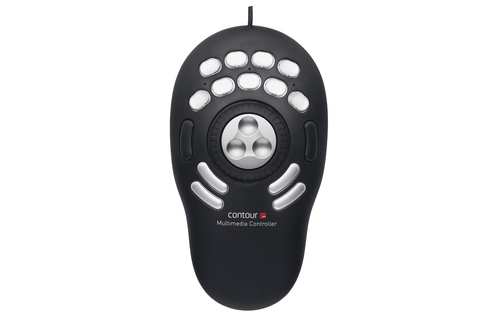
Contour Design Contour Multimedia Controller PRO v2, USB, Black, Silver, Music editing, Photo editing, Video editing, Button, Jog dial, 109 mm, 196 mm
Take control of your multimedia work. Single-handedly. The Contour Multimedia Controller PRO v2 multi-media controller will maximize your audio and video editing, graphic design, or other shuttle and jog productivity with both ideal form and function. Pre-configured for many of the industry’s leading audio and video editing applications, 15 customizable buttons will make working amazingly fast and precise by utilizing commonly used macros.
Contour Multimedia Controller PRO v2 for Video Editors Whether you’re in an NLE like Adobe Premiere or Davinci Resolve, or visual effects software such as Adobe After Effects or Motion our Contour Multimedia Controller PRO v2 will allow you to elevate your editing workflow.
Unprecedented Control Our bespoke jog/shuttle wheel design is a throwback to reel-to-reel analog control editing. With a spring loaded outer shuttle ring that allows users to move the playhead through the timeline at variable speeds. Pair this with an our jog dial that gives users frame by frame control, and you will never have to waste time looking for the perfect spot to make an edit again.
Buttons for Every Function The Contour Multimedia Controller PRO v2 comes equipped with 15 buttons that, once our driver is downloaded and installed, has preset keyboard shortcuts built in for over 100 software programs – Including everything an editor needs.
Would you like to know if our driver comes with presets for the software you prefer?
Your Contour Multimedia Controller PRO v2, Your Workflow Although our driver comes with presets for all of your favorite software, no one knows your workflow better than you! That is why we made an intuitive driver that allows our users to customize the entire button layout of the Contour Multimedia Controller PRO v2 to perfectly match the way you work.
AppDetection The Contour Multimedia Controller PRO v2 driver is able to see the active window on your computer, and will automatically switch the preset shortcuts to match whatever program you are in without ever having to interrupt your workflow.
Contour Multimedia Controller PRO v2 for Music Applications The Contour Contour Multimedia Controller PRO v2 is well-known in the video editing community, but it’s not the first thing that comes to mind when you’re trying to streamline your music production workflow. If you’re not familiar with the Contour Multimedia Controller PRO v2 , it’s a table top input device, connected via USB, and devoted to scrolling, navigation, and keyboard shortcuts, courtesy of a jog/shuttle wheel, and 15 buttons.
There is a level of immediate support for music software, thanks to the supplied presets for Apple’s Logic Pro X, GarageBand, and MainStage, as well as other popular music applications such as Ableton Live, Audacity, Bitwig Studio, Reaper, DJ-1800, Izotope RX, Digital Performer, Studio One, Reason, Reaktor, and Traktion.
A free editor application gives complete control over the Contour Multimedia Controller PRO v2 assignments, so you can use the dial and buttons for keystrokes, scrolling, clicking, opening files or folders, or for selected system commands such as volume and display brightness. For each keystroke you can add modifiers – ctrl, option, shift, or cmd, then enter a qwerty character, or a function key, or a system key such as tab or enter. If you’re already aware of the benefits of using your DAW’s keyboard shortcuts, this should already be planting little idea-seeds in your head!
I’m an Ableton Certified Trainer, and my entire day is spent with Live-related activities – running classes, creating videos, writing tutorials, and the like, so naturally, here I’m using Live as my set-up example. Not everybody uses Live(!), but hopefully it’ll give you some inspiration about how you can use the Contour Multimedia Controller PRO v2 with your own favourite DAW.
As I’ve already mentioned, there’s an Ableton Live preset included in the Contour editor application, but I decided to create my own assignments instead. Live has a fixed array of keyboard shortcuts, which aren’t user-editable, but what makes all the difference is the fact that Live also has something called Key Map Mode, where you can assign qwerty characters to many of Live’s functions, including transport controls, clip launching, software instrument parameters, and so on.
This means that we can go deep with our chosen assignments for the Contour Multimedia Controller PRO v2 (and if necessary you can save more than one set of assignments for the same DAW, perhaps for studio and performance use). I set it up with buttons toggling the Browser, Detail View, Session/Arrangement View, and Mixer. Other buttons were put to work for Stop Clips, scene launching, and effect activation, while the wheel was used to scroll up and down through scenes in Live’s Session View.
For more complex tasks, the Contour Multimedia Controller PRO v2 can send macros – entire chains of key commands and characters – from one button push. Imagine combining this with OS X’s Automator for ultimate one-click-control-chain power! I know what you’re wondering now – can the Contour Multimedia Controller PRO v2 send MIDI? The direct answer is ‘no’, but if you use an intermediate application like Bomes MIDI Translator, that’ll bridge the gap very effectively.
Despite being an Ableton Live user, like most producers I know, I rely on more than one DAW to get everything done, so I pair Live with Logic Pro X from time to time, and I appreciate the way the Contour Multimedia Controller PRO v2 automatically detects which application is foremost and provides the correct settings. Very smooth transition.
Thanks to the included presets, you can use the Contour Multimedia Controller PRO v2 immediately with your favourite DAW, which is great when you don’t have time to mess around, but if you put in a little extra effort to customise the settings, you’ll have an even more helpful addition to your studio.
Contour Multimedia Controller PRO v2 for Photographers Think it’s just for video? Picture this… - Contour Multimedia Controller PRO v2 has pre-set configurations out of the box. Adobe Photoshop CC, Lightroom CC, AutoCAD, Manga Studio, Maya, Apple Photos & Aperture and more are already included in the Mac & PC drivers program. Connect to USB, install the software and you are ready to edit.
- Are you already using Adobe Photoshop Elements, Corel Paint Shop Pro, Google Picasa or Paint.net? Contour Multimedia Controller PRO v2 can be easily configured to use with ANY photo editing application for Mac & PC. 15 programmable buttons, plus the responsive jog-shuttle control can be set up to take care of photo editing tasks that normally require workflow-slowing keyboard access.
- Wacom’s perfect partner. Precision editing from your graphics tablet, combined with unlimited access to shortcuts and keyboard functions via Contour Multimedia Controller PRO v2 give you the optimum photo editing power. Actions, auto-fixes, filters and effects can be at your fingertips whilst you edit, saving you valuable time and enhancing your creativity. Working in tandem with any computer pointing device, Contour Multimedia Controller PRO v2 will save you time and frustration.
- Watch your edit. Tired of looking away from your screen as you look for keyboard shortcuts? Contour Multimedia Controller PRO v2 keeps your commonly used tools and shortcuts at your fingertips so you can concentrate on the on screen action. Why look away when you apply your adjustments or filters? Stay focused and create amazing photos instead.
- Tools and effects. Contour Multimedia Controller PRO v2 is your on-hand selector, allowing you to choose tools, brushes and effects, resize and apply them with the click of a button or a flick of the jog-shuttle control. Why navigate on screen menus, or take time looking for keyboard options when you are already have control of your editing in your hand? For example, Photoshop CC has an amazing array of brushes and pens that you can now select and adjust on the fly using Contour Multimedia Controller PRO v2.
- Repetition? Repetition? Repetition? Batch editing can be a pain, especially when you need to work using keyboard shortcuts or onscreen controls. Contour Multimedia Controller PRO v2 makes life easier by allowing you to automate tasks in any editing suite. Why adjust white balance, colour correction and sharpness manually, when the Contour Multimedia Controller PRO v2 can apply all of these with a single click of a button? Create your own Photoshop style actions for any program using the Contour Multimedia Controller PRO v2’s flexible software and focus more on your creativity.
- Using Sliders? On screen adjustment tools have made life easier in many editing suites. Lightroom CC is a great example where this method of working is at it’s best. Contour Multimedia Controller PRO v2 now gives you the ability to adjust exposure, contrast, clarity, saturation and many others in such programs, simply by using it’s highly responsive buttons and jog-shuttle controls. Keep the cursor where you need it and click and rotate instead for a much more intuitive experience.
- Master of organisation. Contour Multimedia Controller PRO v2 can help you organize your photo collections. Whether reviewing your Mac’s Photos library, checking your holiday snaps in Adobe Photoshop Elements or reviewing your latest professional shoot using Adobe Lightroom CC’s powerful library tools, Contour Multimedia Controller PRO v2 will allow you to zoom, rotate, proof and even apply auto-fixes without necessarily having to move to your keyboard to make changes. Quickly open, preview, adjust and save, speeding up your workflow and allowing you to concentrate on the interesting parts of your creative work.
- Unlimited potential. Because Contour Multimedia Controller PRO v2 has easily configurable software for Mac & PC, and features 15 programmable buttons, plus a an ergonomic jog-shuttle control, you can create unlimited profiles in any photo editing application. Why have one setting for Photoshop or Lightroom, when you can apply a profile for organizing, for editing, for opening and saving files, or even for different sets of tools? While you will point with your tablet pen or mouse, Contour Multimedia Controller PRO v2 can make available any tool or adjustment that normally requires a key-press, in any software you choose to use.
31 specifications
Other products in the same category, those of the same brand first