0815 DE
In stock
Item EUR 405,15 · Shipping free · No mandatory fees · VAT included · New
Delivered total
EUR405,1530-day low (item price): EUR 405,15, 29 Oct
Awin · 2026-10-29 15:22 (Europe/Berlin)
destination context: Germany · EUR
Eizo
2 live offers
Ordered by delivered total, lowest first. Offers whose total is not stated follow; that placement says nothing about their price.
Links to merchants are affiliate links (advertising). Tallybuy earns a commission if you buy. The offers, their order and what you pay stay the same. About affiliate links
In stock
Item EUR 405,15 · Shipping free · No mandatory fees · VAT included · New
Delivered total
EUR405,1530-day low (item price): EUR 405,15, 29 Oct
destination context: Germany · EUR
In stock
Item EUR 496,13 · Shipping not stated · Mandatory fees not stated · VAT included · New
Item price
EUR496,13No delivered total, because the offer does not state: Shipping, fees.
30-day low (item price): EUR 496,13, 29 Oct
destination context: Germany · EUR
0815 DE, one listing
| Day | Lowest | Highest | Last | Checks |
|---|---|---|---|---|
| 29 Oct 2026 | EUR405,15 | EUR405,15 | EUR405,15 | 2 |
| 28 Oct 2026 | EUR405,15 | EUR405,15 | EUR405,15 | 3 |
| 27 Oct 2026 | EUR405,15 | EUR405,15 | EUR405,15 | 3 |
| 26 Oct 2026 | EUR405,15 | EUR405,15 | EUR405,15 | 1 |
| 25 Oct 2026 | EUR405,15 | EUR405,15 | EUR405,15 | 3 |
| 24 Oct 2026 | EUR405,15 | EUR405,15 | EUR405,15 | 3 |
| 23 Oct 2026 | EUR405,15 | EUR405,15 | EUR405,15 | 1 |
| 22 Oct 2026 | EUR405,15 | EUR405,15 | EUR405,15 | 3 |
| 21 Oct 2026 | EUR405,15 | EUR405,15 | EUR405,15 | 3 |
| 20 Oct 2026 | EUR405,15 | EUR405,15 | EUR405,15 | 3 |
| 19 Oct 2026 | EUR405,15 | EUR405,15 | EUR405,15 | 2 |
| 18 Oct 2026 | EUR405,15 | EUR405,15 | EUR405,15 | 3 |
| 17 Oct 2026 | EUR405,15 | EUR405,15 | EUR405,15 | 3 |
| 16 Oct 2026 | EUR405,15 | EUR405,15 | EUR405,15 | 3 |
| 15 Oct 2026 | EUR405,15 | EUR405,15 | EUR405,15 | 3 |
| 14 Oct 2026 | EUR405,15 | EUR405,15 | EUR405,15 | 3 |
| 13 Oct 2026 | EUR405,15 | EUR405,15 | EUR405,15 | 3 |
| 12 Oct 2026 | EUR405,15 | EUR405,15 | EUR405,15 | 3 |
| 11 Oct 2026 | EUR405,15 | EUR405,15 | EUR405,15 | 3 |
| 10 Oct 2026 | EUR405,15 | EUR405,15 | EUR405,15 | 2 |
| 9 Oct 2026 | EUR405,15 | EUR405,15 | EUR405,15 | 3 |
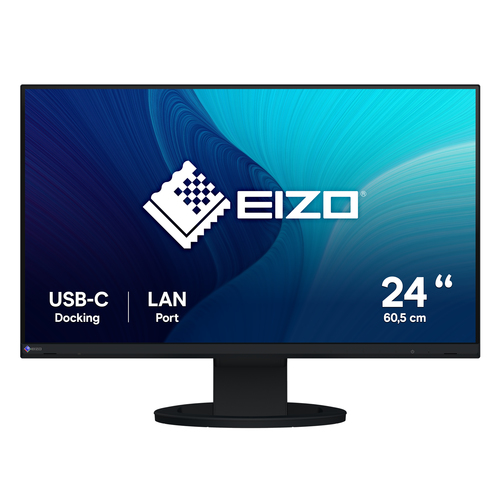
EIZO FlexScan EV2490-BK, 60.5 cm (23.8"), 1920 x 1080 pixels, Full HD, LCD, 5 ms, Black
Get Connected. Get Started. The 23.8-inch EV2490 is a Full HD (1920 x 1080 pixels) USB Type-C docking monitor with LAN and daisy chain capability for increased productivity at the office or at home.
Streamlined Connection with USB Type-C The monitor is equipped with a USB Type-C® connection that allows you display video, playback audio, transmit USB signals, supply power to connected PCs, and even transmit a network signal. This convenient multi-purpose connectivity makes it faster and easier to connect your laptop when moving between workstations or working away from the office.
70 Watt Power Delivery The 70 watt power delivery via USB Type-C reliably charges small desktop PCs or laptops. This eliminates the need for a laptop's bulky power supply unit, freeing up space in your bag and on the desk.
Stable Network Connection While many modern laptops are not equipped with a dedicated LAN port, the monitor has one directly built in for a stable wired connection. Connecting any laptop via USB Type-C allows access to the network through the monitor. This allows you to conduct online conference calls or data transfers reliably and at high speed.
Directly Connect Peripherals While many modern laptops are designed to be thin and more portable, they often have limited connectivity options for peripherals. Connecting to the monitor via USB Type-C gives access to a hub with three USB Type-A and one USB Type-C ports for easily connecting an external keyboard, mouse, or web camera.
Efficient Multi-Screen Setup The monitor's USB Type-C connection supports daisy chaining for easily connecting multiple monitors from a single video signal output. This allows you to effortlessly connect up to four screens.
When using multiple applications, such as Outlook, Excel, or web conference on a laptop with a small screen, the windows overlap, often requiring you to switch between them. With multiple monitors, you can have large enough screen to display multiple applications simultaneously, allowing you to boost work efficiency.
Convenient Connection and Comfortable to Use The monitor makes connection to a PC convenient and includes various features and functions for working more comfortably.
Multiple Connectivity and Flexibility The monitor is equipped with USB Type-C, DisplayPort, and HDMI® video inputs for flexible connection. It is convenient for use in offices that have a free address system, where employees do not have fixed seats and can freely use any available seat to work, or in open spaces where participants can bring their own laptops to meetings.
Improve Work Efficiency The monitor is equipped with a 23.8-inch IPS panel with Full HD (1920 x 1080 pixels) resolution. When connected to a laptop, for example, the total available screen area is about three times that of a 14-inch laptop. This improves efficiency by allowing you to display more information at once instead of needing to frequently switch windows.
Comfortably Fits in Modest Workspaces The monitor features a space-saving design with a width of 537.8 mm and a depth of 230 mm. With its small footprint, it fits neatly into even the most modest workspaces or home offices to save more desk space. In addition, the stand has a wide adjustable range of 191.2 mm, allowing you to comfortably place a laptop under the monitor for a quick and compact multi-screen configuration.
Versatile Stand for Optimal Positioning The stand has a wide adjustment range, featuring height adjustment, tilt and swivel. This allows you to set the monitor to the perfect position, whether sitting or standing at your desk.
Portrait Mode for Vertical Viewing The versatile stand allows you to rotate the monitor to portrait mode for reading long text documents or vertically optimized webpages and applications.
Built-In KVM Switch for Multiple PC Operation The monitor's USB Type-B and Type-C upstream ports have a built-in KVM function, allowing users to use a single mouse and keyboard for up to two connected PCs for an even cleaner workspace. Furthermore, the peripherals connected to the monitor's USB hub and its network connection switch to the selected PC for a smooth operation on the selected computer.
Streamlined Mouse Operation The Mouse Point Utility function of EIZO's free Screen InStyle software provides an easy-to-see visual indicator that helps you quickly locate the cursor. It also allows you to move the cursor freely between monitors without the barrier typical of conventional multi-monitor setups.
Synchronize Screen Adjustments Screen InStyle will apply any color adjustments you make to one monitor to the others on your desktop for consistent color across all screens. In addition, any changes detected by the brightness sensor of one monitor you assign will be applied uniformly to your other monitors. Furthermore, when daisy chaining multiple monitor monitors with USB Type-C, changes are conveniently reflected on all connected monitors automatically.
Aesthetically Pleasing Design A monitor's aesthetic can go a long way in creating a more comfortable atmosphere. The monitor's minimalistic design and its ergonomic functions allow it to fit naturally in your work environment, whether you are in the office or at home.
Bezels that are Barely There The monitor implements a virtually frameless design for a minimalistic aesthetic. There is very little distance between the display area and the bezels, making the monitor easy to blend in with the environment.
Color Coordination Monitor cabinet is available in white or black and the aesthetically-pleasing design of the monitor extends to the stand and the cables. You can choose white for offices with a bright and gentle atmosphere, and black for offices with a chic and relaxed atmosphere.
Reduce Cable Clutter with Daisy Chain Cable management becomes easier with USB Type-C. Multiple monitors can be connected in a daisy chain using the short 1 meter cable, CC100, tidying up the back of your desk for an even cleaner office aesthetic.
Say Goodbye to Tired Eyes The monitor is equipped with functions to help users concentrate on work by keeping their eyes comfortable throughout the day.
Auto Brightness Control To prevent eye fatigue, a brightness sensor called Auto EcoView detects the changes in the ambient brightness that occurs throughout the day and automatically adjusts the screen to the ideal brightness level.
Clear View from All Angles The monitor uses an LED-backlit IPS (in-plane switching) LCD panel with 178° viewing angle that minimizes color shift and contrast changes when viewing the screen at an angle. This means that two people sitting at the one computer can easily see the screen with high image quality.
Reduce Blue Light by 80% Printing work-related documents is becoming less common due to the increase in home offices, telecommuting, and stricter security measures. Paper Mode reduces the amount of blue light emitted by the monitor, helping to prevent eye fatigue when reading digital documents. When used in conjunction with the Auto EcoView dimming function, blue light is reduced by as much as 80%.
Flicker-Free Viewing Due to the way brightness is controlled on LED backlights, a small number of people perceive flicker on their screen which causes eye fatigue. The monitor utilizes a hybrid solution to regulate brightness and make flicker unperceivable without any drawbacks like compromising color stability – even on low brightness settings.
Minimum Brightness of 1 cd/m2 In a dimly-lit work environment, a monitor with low brightness settings is more comfortable to use. With its LED backlight, the monitor is adjustable to approximately 1 cd/m2 which is less than 1% of the maximum.
Non-Glare Panel A non-glare panel reduces eye fatigue by dissipating reflective light that would otherwise make the screen difficult to view from different positions.
Exceptional Image Reproduction The monitor converts the data from an 8-bit input signal and selects the optimal gradations for smooth image display. Furthermore, each monitor is individually measured and adjusted at the factory prior to shipping for exceptional image quality out of the box.
104 specifications
Other products in the same category, those of the same brand first